Resident Portal
- 4.8
- Rating
- 1.00M
- Installs
- Free
- Price

 Analysis by App-foxy
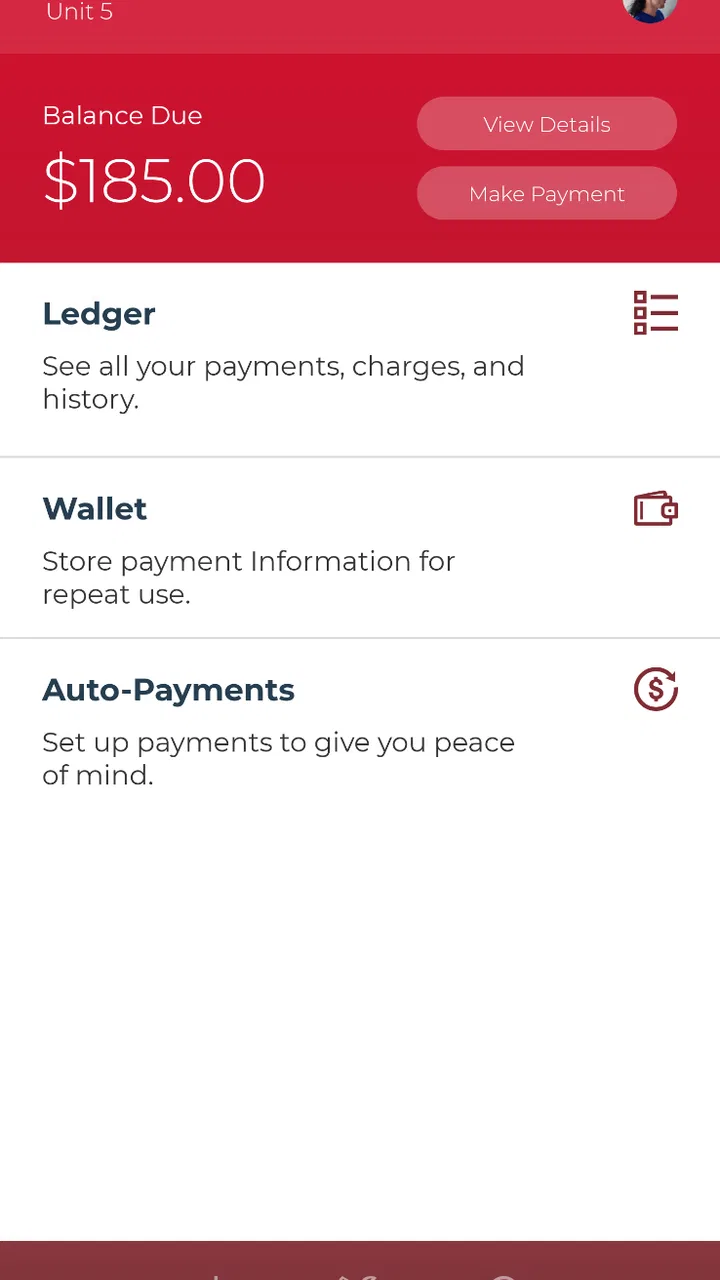
Resident Portal is the kind of lifestyle app I only appreciate after the first small problem appears. Paying rent is rarely exciting, and sending a maintenance request is usually something I would rather finish quickly than think about. Entrata, Inc has built this app around those recurring resident tasks, giving them a single place instead of leaving me to search through old emails, paper notices, or a property office website.
My first impression was practical rather than flashy. The app is free, aimed at everyone, and focused on the relationship between a resident and their property. Its store summary centers on rent payments, maintenance requests, and communication, and that narrow purpose is important: this is not a general home-management tool or a social app. It is a resident portal in the most literal sense.
That focus gives it a clear chance to earn a lasting place on a phone. The real test is not whether I enjoy opening it during the first week, but whether it remains useful when rent is due again, a repair needs documenting, or I need to check what has already been reported. In my experience, Resident Portal succeeds when the property actively uses the Entrata system, while its value depends much less on novelty than on reliable repetition.
You May Also Like

 Blood Strike: 2.5 Anniversary
Blood Strike’s Loadouts Turn Every Drop Into a Tactical Gamble
A close look at Blood Strike’s custom loadouts: how fast access to signature weapons reshapes its battle royale rhythm, rewards preparation, and narrows the gap between fights.

 Pandora - Music & Podcasts
Pandora’s Music Is Easy to Start, but Harder to Recover
Pandora’s strength is its low-effort path from a seed to a station. Its weak spot is how much confidence it asks you to place in connection, setup, and quiet recovery.

 8 Ball Pool
 Is Built on Rivalries, Rematches, and Routine
A close look at the rivalries, rematches, shared routines, and unanswered safety questions that turn a quick pool match into a persistent mobile community.

 Samsung Music
’s Quiet Strength Is Playing What You Already Own
Its reach comes less from spectacle than from dependable access to a personal library. That simplicity is both the app’s strongest retention engine and its ceiling.

 AccuWeather: Weather Radar
AccuWeather Review: A Quick, Clear Forecast for Everyday Decisions
For everyday plans, the best forecast is the one you can understand quickly. AccuWeather makes rain timing, radar, and local conditions easy to act on, with a few trade-offs.

 Hill Climb Racing
Why Hill Climb Racing Still Turns Crashes Into One More Run
A tiny car, a bumpy hill and one more upgrade: Hill Climb Racing keeps resurfacing because its simple chaos makes every near-miss feel personal.
More From Our News Desk



From quick setup to the first useful task
The first-week appeal comes from reducing the number of places I need to check. A resident dealing with rent, a broken appliance, or a question for the property normally has several possible routes: a leasing-office visit, a phone call, an email thread, a browser portal, or a notice posted somewhere in the building. Resident Portal brings the main resident-facing actions into an app, which makes the experience feel more direct.
The strongest early use case is a simple one: I notice that a kitchen fixture is leaking just before leaving for work. Instead of waiting until the office opens or trying to describe the issue over the phone, I can use the maintenance area to submit the request and communicate with the property through the same resident channel. That does not repair the fixture by itself, of course, but it creates a more sensible starting point than relying on memory or an informal message.
I also like the separation between an urgent household problem and an ordinary administrative task. Rent payment belongs to a predictable routine, while maintenance is event-driven and often needs more context. Keeping both within the same property-facing app is convenient, especially for someone who has recently moved and has not yet learned the office’s preferred process.
There is an important condition behind that convenience: the property must support and maintain its Resident Portal connection. The app cannot replace a leasing team that does not respond, and it cannot turn an unorganized maintenance process into an organized one overnight. I would treat it as the digital front door to a participating property, not as an independent service that works the same way for every renter.
That distinction also answers a question many new residents have: can anyone use it simply because it is available in an app store? In practice, the useful experience is tied to being a resident whose property uses the relevant Entrata resident system. If your landlord or management company has not directed you to this portal, installing it alone is unlikely to provide much value.
The app has a broad audience on paper, with an Everyone content rating, but that does not mean every household will find it equally useful. It is best for residents who want a straightforward mobile route for property business. It is less compelling for someone whose landlord handles everything through a different platform or who already has a responsive, well-organized alternative that they prefer.
What makes the first week worthwhile
I would begin by signing in before an urgent issue appears. That gives me time to understand where rent-related actions and maintenance requests live, rather than learning the interface while water is spreading across a cabinet. I would also check that the resident and property details look correct before relying on the app for an important payment or service request.
A useful habit is to write maintenance requests as if another person will need to act without asking a follow-up question. I would describe the location, the visible symptom, when it began, and whether the problem is constant or occasional. If the app provides a way to add relevant context, that is where a short, precise description is more valuable than an emotional one. The app’s usefulness improves when the request itself is actionable.
For rent, I would avoid treating the app as a last-minute emergency button. A mobile payment screen can make a task feel finished quickly, but the responsible workflow still includes checking the amount, the selected property or account, and the completion confirmation. The convenience is real, yet the resident remains responsible for making sure the transaction is submitted correctly.
That is one of the less obvious trade-offs here. A dedicated portal can reduce friction, but it can also make administrative actions feel so routine that I move too quickly. I recommend slowing down for the final review of any payment or request. The app is most helpful when it supports a careful routine, not when it encourages me to tap through one.
Why the value either grows or fades over the months
After the first few uses, Resident Portal becomes less about discovery and more about recurring value. Rent is the clearest reason to return. A familiar mobile route can be easier than remembering a browser address or locating a property email, particularly for residents who manage several monthly obligations from their phones.
The maintenance side has a different kind of long-term value. A repair request is not just a message sent into the void; it is part of a timeline of communication with the property. When a problem returns, being able to refer back to what was reported can help me explain the situation more clearly. I would still keep my own notes for serious or repeated issues, but having the original request in the resident channel is more useful than relying on a vague recollection.
This is where the app compares favorably with ordinary alternatives. A phone call may be faster for a genuinely urgent situation, but it is harder to review later. Email can preserve a record, but it may scatter the conversation across threads and addresses. Visiting the office allows direct discussion, yet it is inconvenient outside office hours. Resident Portal occupies a useful middle ground: structured enough for routine property tasks, but more accessible than an in-person visit.
It is not automatically better than a property’s own website. A browser portal may offer a wider view of account information, and some residents prefer using a computer for anything involving money or detailed records. I see the app as the better choice when speed and availability matter, while the web alternative may be more comfortable for careful review or for people who dislike handling administrative work on a small screen.
The app’s wider adoption suggests that this model has found a practical audience. It has more than a million installs, a 4.8 average from roughly seventy-three thousand ratings, and around ten thousand written reviews. Those figures do not guarantee that my property’s implementation will be flawless, but they do indicate that Resident Portal is not an obscure experiment that disappears after one use.
Its release history also matters in a quiet way. The app has been available since April 18, 2014, and the current version is 5.66.0. For me, that long presence makes the app feel more like infrastructure than a novelty. A resident portal earns trust through continued maintenance and repeated use, not through a clever first screen, so longevity is relevant even though it cannot substitute for a good property team.
A realistic monthly routine
Imagine a resident who normally pays rent during a crowded morning commute. With Resident Portal already configured, the task can become a short monthly check rather than a search through messages. I would open the app, review the amount and account context, submit the payment, and retain the confirmation according to my own record-keeping habit. That is not glamorous, but it is exactly the kind of repetition where a focused app can justify its place.
Later that month, the resident notices that the building’s laundry room machine is repeatedly stopping mid-cycle. A good request would identify the machine and location, explain the repeated failure, and mention whether the issue affects one attempt or several. If the property communicates through the portal, future updates stay closer to the original issue than they would in a chain of unrelated texts.
That scenario shows why recurring value depends on discipline from both sides. I can submit a clear request and check for communication, but I cannot control how quickly the property responds or how well the repair is handled. Resident Portal improves the handoff; it does not guarantee the outcome.
The maintenance burden behind the convenience
Every app that handles household administration creates a small maintenance burden of its own. I need to keep the app updated, remember my sign-in details, and make sure notifications or messages do not get overlooked. The current version requires Android 8.0 or later, so anyone using an older Android device should check compatibility before making it part of a rent routine.
I would also avoid depending on a single digital channel for an emergency. A maintenance request in an app is appropriate for normal property service, but a serious hazard may require the property’s emergency contact method or local emergency services. The portal is a record and communication tool, not a substitute for judgment about urgency.
Another maintenance task is checking the status of open issues instead of assuming that submission equals resolution. If I report a repair and never look again, I may miss a question from the property or fail to notice that an appointment needs coordination. The app can make follow-up easier, but it still rewards residents who build a small checking habit.
Privacy and device habits deserve attention as well. Because this is a resident-facing app connected to property matters, I would use a screen lock, avoid leaving an account open on a shared device, and review payment information carefully before confirming anything. These are not reasons to avoid the app; they are sensible precautions whenever a phone contains housing and financial information.
There is also a human maintenance burden at the property level. If management changes procedures, stops responding in the portal, or gives residents conflicting instructions, the app becomes less dependable even if its interface remains unchanged. In that situation, I would follow the property’s current official instructions and keep evidence of important requests rather than assuming the digital workflow is always authoritative.
Where repeated use can become tiring
The main source of fatigue is that Resident Portal is useful precisely because it deals with chores. Rent payments and repair requests are necessary, but they are not activities I want to browse for pleasure. Once the initial convenience wears off, the app must stay quick and predictable. If I have to hunt through screens for a familiar task, the advantage over a browser or email begins to shrink.
Communication can also become tiring when several issues are active at once. A resident might have a repair in the apartment, a question about a building facility, and a monthly payment to manage. The portal’s single-property focus is convenient, but it also means that the quality of organization matters. I would keep a simple personal note of open issues, dates, and important responses rather than expecting the app alone to serve as my entire housing record.
Another limitation is the gap between digital submission and real-world service. A polished request form can make me feel that progress has happened, when the actual repair still depends on staffing, parts, access, and scheduling. I appreciate the app most when I judge it by the quality of the handoff and the clarity of communication, not by whether it makes a physical problem disappear.
Residents who prefer speaking to a person may find the portal impersonal. A phone call can resolve ambiguity immediately, and an office conversation may be the right option for a complicated lease or sensitive issue. I would not force every interaction through the app. For routine tasks, it is efficient; for nuanced disputes or urgent matters, a direct human channel may be better.
There is a similar trade-off for people who use multiple properties or move frequently. The app is designed around resident-property communication, so its usefulness follows the property relationship. It is not a universal organizer for every landlord, lease, utility, and household document. Someone seeking that broader view may prefer a general finance or document-management tool alongside the portal.
The free price removes an obvious barrier, but free does not mean frictionless. The real cost is attention: remembering to check messages, verifying payments, and following up on unresolved requests. I think that cost is reasonable when the property uses the system consistently. It becomes harder to justify when the app is treated as an optional inbox that staff rarely monitor.
Who should keep it installed
I would recommend keeping Resident Portal installed if rent payments, maintenance, and property communication are already handled through Entrata at your home. The app is especially useful for residents who are often away from the leasing office, prefer written records, or want to report issues as soon as they notice them rather than waiting for business hours.
It also suits people who benefit from a repeatable monthly routine. The app does not need to be opened every day to be worthwhile. A few purposeful visits tied to rent and household issues can be enough, provided I remember to review confirmations and follow up on open requests.
I would be more cautious about recommending it to someone whose property insists on phone calls, email, or a different portal. Installing another app will not simplify the process if the management team does not recognize it as the proper channel. I would also suggest a browser or direct contact for residents who need extensive account review, have complex disputes, or are uncomfortable handling administrative payments on a phone.
For new residents, the best approach is to ask the property which actions belong in the app and which still require another route. That small clarification prevents a common mistake: assuming that because a feature exists, every request should be sent there. Knowing the boundaries of the portal is part of using it well.
My long-term verdict on Resident Portal
Resident Portal earns lasting space on my phone when it replaces scattered resident chores with a dependable routine. Its strongest contribution is not entertainment or innovation; it is the quiet reduction of friction around rent, maintenance, and communication with a participating property. Entrata, Inc has kept the product active over many years, and its broad install base and strong average rating show that the basic idea resonates with a large number of residents.
My recommendation comes with a clear condition: judge the app together with the property that operates it. A responsive management team can make the portal feel like a useful record and a convenient service desk. An unresponsive team can make it feel like a form submission with no meaningful follow-through. The app improves the channel, but it cannot control the service behind the channel.
For everyday use, I would install it, complete the initial setup before rent or a repair becomes urgent, and develop two habits: verify important submissions and revisit unresolved requests. I would keep a separate note for serious maintenance problems, use the property’s emergency route when appropriate, and switch to a browser or human contact whenever the task needs more detail than a mobile workflow handles comfortably.
After the novelty fades, that is enough. Resident Portal does not need to become an app I open constantly. It needs to be available when a monthly payment or household problem demands attention, and it needs to make the next step clearer than the usual alternatives. For residents whose property genuinely uses the Entrata system, I think it does that well enough to remain installed. For everyone else, its value is limited by the property relationship, and another established channel may be the smarter choice.
FAQs for Resident Portal
01What features does the Resident Portal app offer?
The Resident Portal app provides a range of features designed for convenience and efficiency. Users can pay rent, submit maintenance requests, and communicate with property management directly from their mobile devices. Additionally, the app often includes community announcements, event calendars, and access to lease agreements and documents.
02Is the Resident Portal app secure for managing sensitive information?
Yes, the Resident Portal app employs robust security measures to protect user data. It utilizes encryption to safeguard personal and financial information. Regular updates ensure compliance with the latest security standards, providing users with peace of mind while handling sensitive transactions and communications.
03Can I access the Resident Portal app from multiple devices?
Absolutely, the Resident Portal app is designed for accessibility across multiple devices. Users can log in from smartphones, tablets, or computers to manage their accounts. This cross-platform compatibility ensures that residents can stay connected and manage their living arrangements from anywhere at any time.
04Does the Resident Portal app support multiple languages?
The Resident Portal app typically supports multiple languages, catering to diverse communities. Users can select their preferred language in the app settings, making it easier for non-native speakers to navigate the interface and access all functionalities comfortably and effectively.
05How often is the Resident Portal app updated?
The Resident Portal app receives regular updates to enhance functionality and security. Developers frequently release new versions to fix bugs, introduce new features, and improve user experience. Notifications about updates are usually sent to users, ensuring they have access to the latest improvements.
Pros
- User-friendly interface makes navigation easy.
- Real-time updates on maintenance requests.
- Secure online rent payment options.
- Access to community events and updates.
- 24/7 access to important lease documents.
Cons
- Limited customization options for users.
- Occasional lag in notification delivery.
- Some features require stable internet.
- May not support older device models.
- Limited customer support availability.

Resident Portal
Gallery